• No upfront license payment
Log in

Independently evaluated Expert Advisors for MT4 and MT5 traders.

Tested Expert Advisors.No Upfront License Payment.

No upfront license payment: broker partner commission funds the service. The developer issues your license once we approve your partner account, and access continues while the account stays eligible. How It Works →
Explore Advisors →

Platforms and tools used in our EA research

A Backtest Is Not Proof.Our Evaluation Goes Further.

Every Expert Advisor must undergo independent technical evaluation before it can be listed on ForexLAB Access.

  • Real-Tick Backtesting
  • Realistic Execution Costs
  • Out-of-Sample Validation
  • Risk & Robustness Analysis
  • Forward Performance Verification
  1. Step 01: Discovery

    AI-assisted research to identify promising trading algorithms.

  2. Step 02: Testing

    Real-tick backtests, trading costs, and out-of-sample testing.

  3. Step 03: Verification

    Cross-checking backtests against verified trading records.

  4. Step 04: Due Diligence

    User feedback, developer reputation, and strategy risks.

  5. Step 05: Selection

    Only approved EAs with favorable licensing terms.

Broker Selection

Selected for
Algorithmic Trading.

We partner with reputable brokers selected for their execution quality, competitive trading costs, and suitability for automated strategies.

  • IC Markets
  • Tickmill
  • RoboForex
  • IC Trading
  • Fusion Markets
  • FP Markets

Compatibility is confirmed separately for each advisor. Brokers do not endorse or certify the advisors listed on ForexLAB Access.

How It Works

Beyond Backtests. Real Evidence.

We use advanced robustness testing tools to challenge trading strategies, assess their risks, and cross-check backtest results against real trading account records.

Advanced Robustness Testing

Monte Carlo simulations, stress testing, and statistical validation.

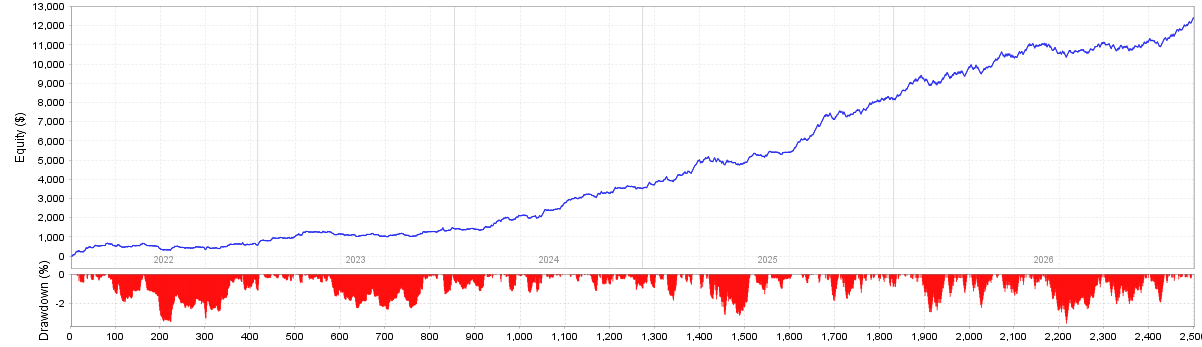
Backtest equity curve with the drawdown chart below it, about 2,500 trades from 2022 to 2026. Simulated research example.
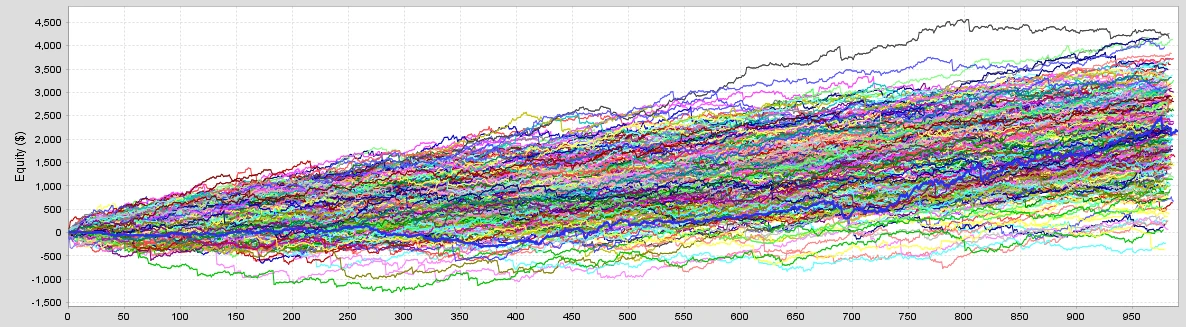
Monte Carlo robustness test: hundreds of simulated equity paths. Simulated research example.
Equity curve with a shaded Monte Carlo confidence range from 03.03.2026. Simulated research example.
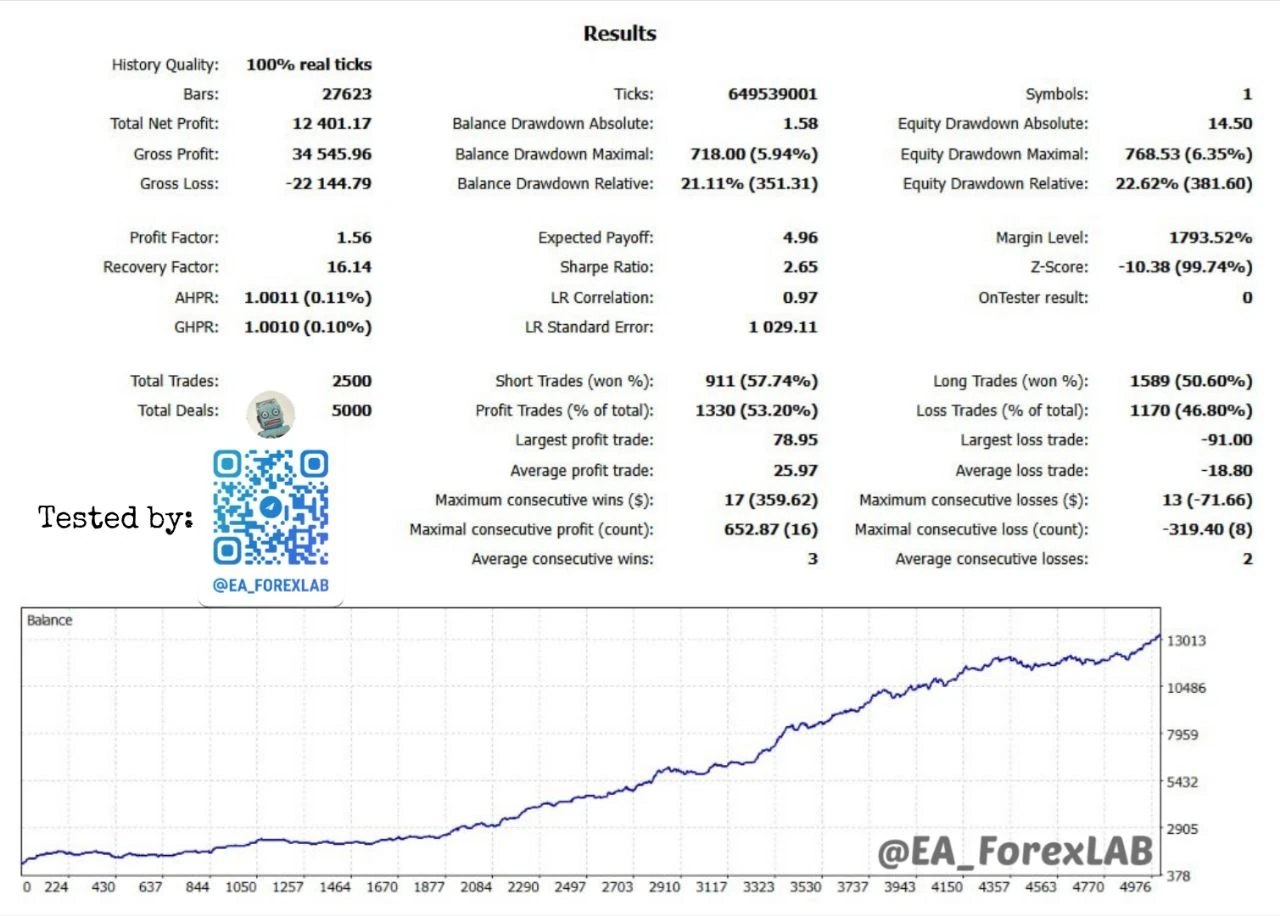
MetaTrader strategy tester report with 100% real ticks, 2,500 trades, statistics and balance chart. Simulated research example.

Real Account Verification

Comparing simulated results with actual trading performance.

Account monitoring
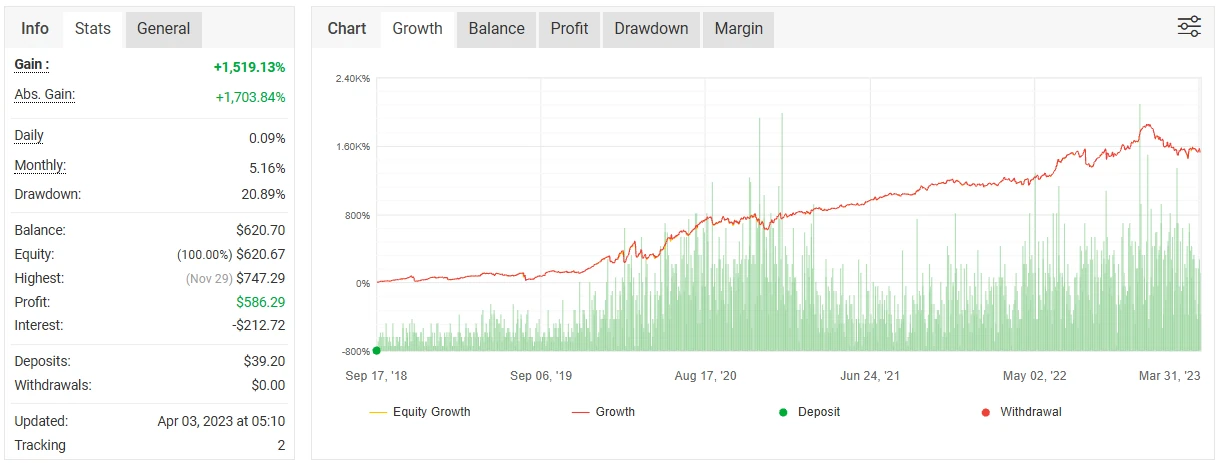
Historical account monitoring snapshot, last updated 3 April 2023: growth chart and account statistics. Not current performance.

Illustrative research examples from different trading systems.

How It Works

From Approval
to Access.

Choose an advisor, verify your partner account and receive your license. Partner commission funds the service while your account stays eligible.

  • Your path
  • EA
  • Partner account
  • License
  • Eligibility

How Access works for you

  1. 01Choose Your EAExplore independently evaluated trading algorithms.
  2. 02Connect Your AccountVerify your account with an eligible partner broker.
  3. 03Get Your LicenseReceive your EA without an upfront license payment.
  4. 04Keep TradingContinue using your EA while your account remains eligible.
Why No Upfront Price

How Access Is Funded.

Broker partner commissions fund Access, so you can use evaluated EAs without purchasing a license.Trading involves risk. Returns are never guaranteed.

No Upfront License Fees

Access professionally evaluated
Expert Advisors without purchasing
a license.

Commission-Funded Access

Broker partner commissions fund
the service. No additional license
payments or cashback.

Access While Eligible

Keep using your Expert Advisor as
long as your broker account meets
the program requirements.

FAQ

Before you get started.

Clear terms. No surprises.

Full conditions: Access Terms · Coming soon

  • No. You do not buy the EA license. ForexLAB Access is funded by the commission our broker partners pay us, and nothing becomes a debt or an invoice later, even if you stop trading.
  • No. ForexLAB charges nothing for EA access. Your broker’s usual spreads, commissions and swaps still apply, as on any trading account, and the only paid extra is optional assisted setup.
  • ForexLAB evaluates every advisor before it can be listed. Depending on the advisor, this covers backtests on high-quality tick data with realistic spreads and commissions, out-of-sample and forward testing, risk and drawdown analysis, and comparison with live account records where they exist. Each advisor page states what was tested and its known limits.
  • Your account must be with one of ForexLAB’s broker partners and registered in our partner group. Each advisor page lists the brokers and account types it supports.
  • Often, yes. An existing account qualifies once the broker moves it into ForexLAB’s partner group, which depends on the broker’s approval, so not every account can be moved.
  • Once ForexLAB confirms your account in the partner group, the developer issues a license tied to that account. You can download and use the EA as soon as the license is active.
  • Yes. You can request several advisors, each under the same conditions. Every license is tied to one trading account.
  • No. An account used for Access does not earn cashback or rebates, because the partner commission funds your EA access. Cashback earned before the account joined Access, and your other ForexLAB Rebate accounts, are not affected.
  • After three full calendar months in a row without confirmed trading, ForexLAB sends you a warning with the reasons and gives you 7 calendar days to respond. Access is suspended only after that review, and missing broker reports never count as inactivity. You can request restoration later at no cost.
  • EA access ends when the account leaves ForexLAB’s broker partner group. You owe nothing, and no warning period applies in this case.
  • Possibly. Each transfer needs individual approval from ForexLAB and the developer, and the new account must be verified in our partner group. A license runs on one trading account at a time.
  • Yes. Optional assisted setup costs $100 and includes advisor installation, configuration and VPS setup. VPS hosting is not included. Coming soon
  • No. Testing shows how an advisor behaved under specific historical and live conditions, not how it will perform in the future. Trading involves risk, and you can lose money.

Start with one
ForexLAB account.

Create your account, link an eligible partner account and choose an advisor. Spreads and commissions stay the same; Access accounts earn no cashback. Trading involves risk of loss; past or simulated results never guarantee returns.

Coming soon